

TL;DR: React Compiler v1 can automatically memoize components, values, and functions, but it does not repair impure code or make every interaction faster. Adopt it incrementally, keep
eslint-plugin-react-hooksin CI, understand skipped files, audit manual memoization by intent, and measure render work and field INP. Delete a memoization wrapper only after a representative production path proves it is redundant.
Why this matters in 2026
Manual memoization is a tax on every React codebase. useMemo, useCallback, and memo can prevent useful work, but they also add dependency arrays, comparison behavior, stale closure risks, and review overhead. Many teams add them in response to a profiler trace and never revisit whether the original bottleneck still exists.
React Compiler v1 changes the default optimization conversation. The compiler analyzes component code and inserts memoization when its model of data flow and mutation says that work can be reused. The React Compiler 1.0 announcement describes this as build-time optimization rather than a runtime cache you tune by hand. React 19.2 also adds performance tracks and related tooling that make render work easier to inspect.
That does not mean you should remove every useMemo in one pull request. Compiler adoption is a correctness and observability exercise. Unsupported syntax, impure rendering, incompatible libraries, and invalid hook patterns can cause a component to be skipped. The application can be partly compiled, which makes a measured rollout more valuable than a binary migration.
Key terms and mental model
| Term | Meaning | Production implication |
|---|---|---|
| Automatic memoization | The compiler reuses safe component, value, or function results | Less manual optimization code, not a promise of zero renders |
| Bailout or skip | The compiler cannot safely transform a component or file | The component keeps normal React behavior and needs visibility |
| Rules of React | Purity, hook, mutation, and component structure constraints | Violations are optimization blockers and possible correctness bugs |
| Manual memoization | memo, useMemo, or useCallback added by a developer | May still be intentional for effect dependencies or external contracts |
| Compiler diagnostics | ESLint feedback that surfaces unsupported patterns | Can improve code even in files that are not yet compiled |
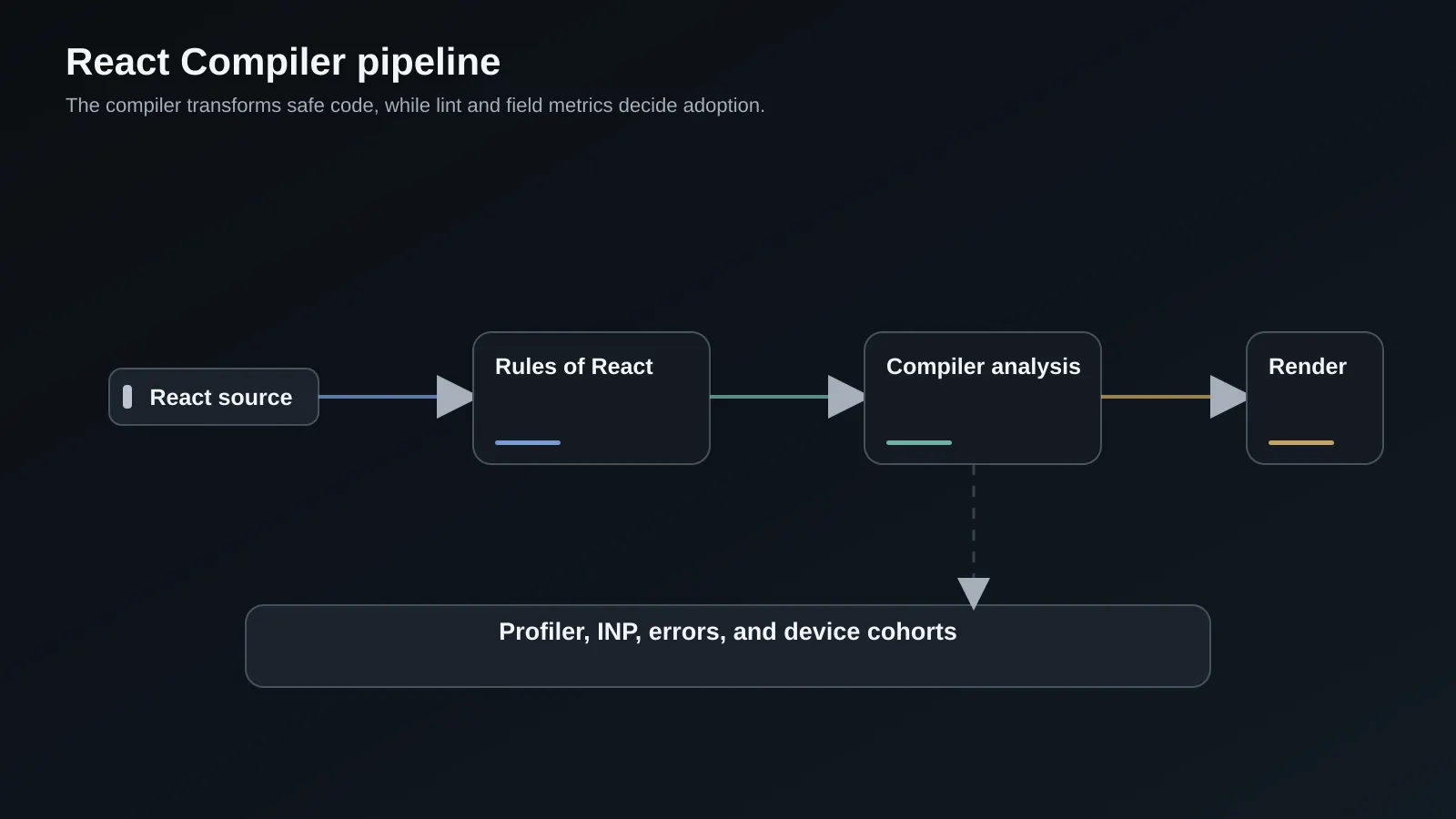
The mental model is a pipeline:
source -> Rules of React diagnostics -> compiler analysis -> transformed module
       -> runtime render -> profiler and field telemetry -> adoption decision
The compiler is not a replacement for component design. If a component owns too much state, receives unstable objects from a parent, or renders a large list without virtualization, automatic memoization may reduce some work while leaving the architectural bottleneck intact.
Establish a performance baseline first
Choose three paths that represent the cost of your product: a dashboard with frequent updates, a form with validation and dependent fields, and a list or editor with high interaction frequency. Record route, device class, data volume, React version, compiler mode, and build commit. Use the React Profiler in a production-like build, browser performance traces, and field INP where available.
Measure the work the user experiences:
- number and duration of commits during a key interaction,
- time from input to visible state update,
- rerender count for expensive child components,
- script evaluation and hydration time,
- memory and long-task behavior on representative devices.
Do not use render count as the outcome by itself. A component can render more often but do less work, or render less often while each render becomes more expensive. Mark interactions such as filtering, opening a command palette, switching a tab, and saving a form so the trace has a business meaning.
Our performance and analytics services are useful when field data and component traces disagree. The important point is to connect a React optimization to the user journey and device population that made it worth changing.
Adopt the compiler incrementally
Start with an application that already has a clean build and a useful lint baseline. Install the compiler in the build pipeline, enable it for a small route or directory, and keep the rollout switch visible. The React documentation covers incremental adoption, configuration, debugging, and directives. Pin the compiler version while the team learns its diagnostics and upgrade behavior.
// next.config.js
const nextConfig = {
  experimental: {
    reactCompiler: true,
  },
};

module.exports = nextConfig;
The exact framework configuration can change, so confirm it against the version of Next.js or the bundler you run. For a larger application, a directory-level or package-level rollout is easier to reason about than an all-or-nothing switch. Build the same commit twice if your pipeline allows it, one with the compiler and one without, then compare emitted output, test results, and runtime traces.
Use a feature flag for the user-facing risk when the build system supports it, but remember that compiler transformation happens at build time. A runtime flag cannot restore an untransformed module from a transformed bundle. If you need a true runtime rollback, publish two artifacts or use a build-time release variable.
Keep the Rules of React non-negotiable
React Compiler depends on predictable component behavior. Rendering must be pure: do not mutate props, state, or module-level values during render. Hooks must be called in stable order. Do not write to refs as a hidden state channel, read changing globals as if they were inputs, or use a library that mutates objects passed into components.
Enable the latest compatible eslint-plugin-react-hooks. Its value is broader than compiler adoption. The React ESLint reference documents diagnostics for hooks, purity, immutability, incompatible libraries, static components, and other patterns. The compiler can skip a component that it cannot optimize, while the lint plugin still gives you a path to fix the underlying code.
Treat a new diagnostic as a design question. A component that reads a global clock during render may be violating purity. A hook called from a factory may make ownership unclear. An incompatible library may mutate a draft object or depend on identity in a way the compiler cannot prove safe. Suppressing the diagnostic should require a reason and an owner, not just a comment added to get CI green.
Audit useMemo, useCallback, and memo by intent
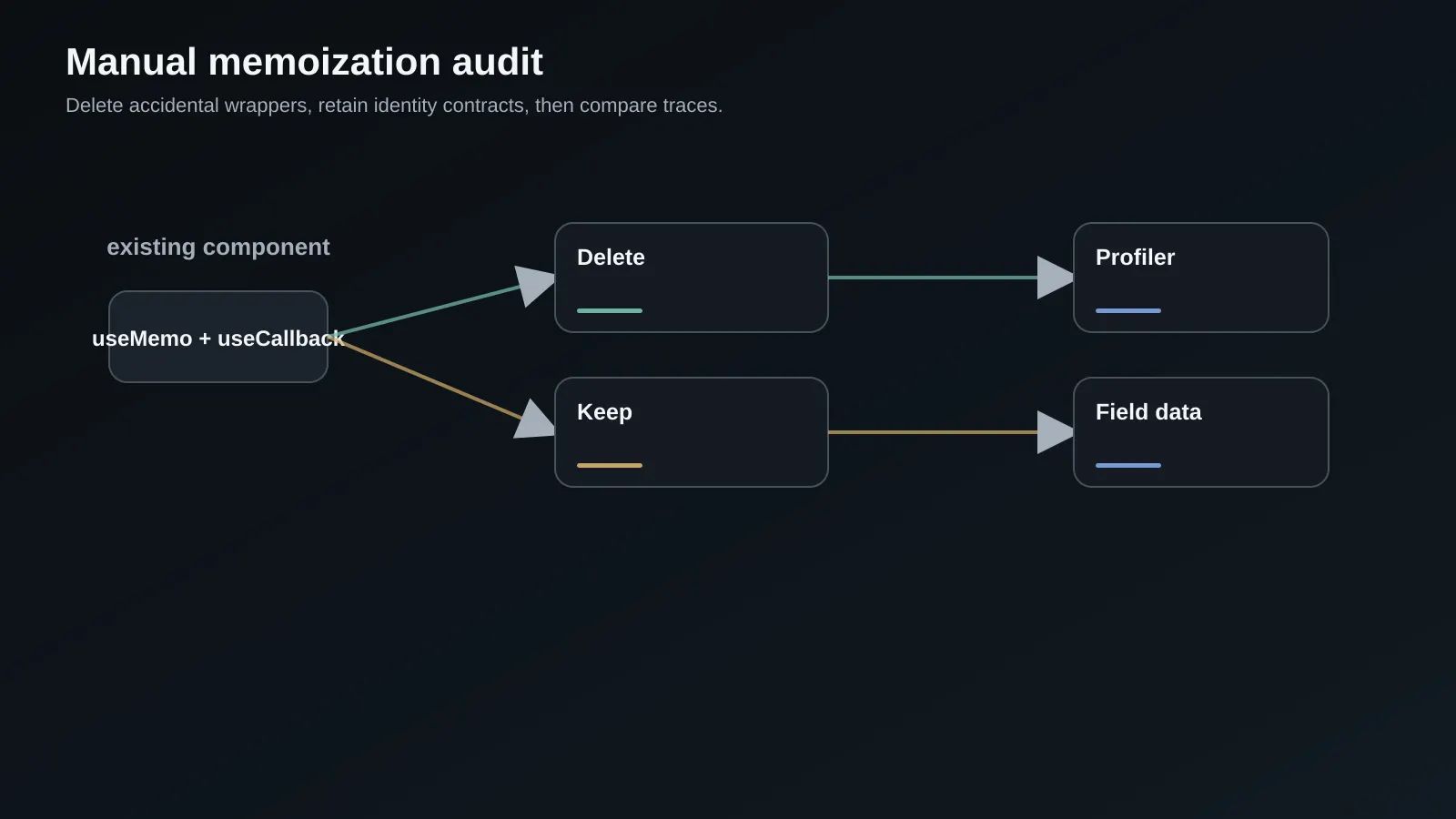
Create an inventory of manual memoization. For each occurrence, record the expensive work, the reason it was added, the inputs, the consumers that depend on stable identity, and a trace showing its benefit. This separates performance memoization from semantic identity.
| Pattern | Usually keep initially | Candidate for deletion |
|---|---|---|
useMemo around a 2-line object | No, unless identity is an API contract | Yes, after compiler and tests prove no behavior change |
useMemo around a large sort or parse | Yes until measured | Later, if compiler produces equivalent work reuse |
useCallback passed to a third-party hook dependency | Often | Only after effect or subscription semantics are tested |
memo around a chart or editor boundary | Often | Only after profiling the real data and interaction path |
useMemo used to hide a mutation or stale dependency | No | Replace the bug, do not preserve the wrapper |
The compiler's automatic memoization is conceptually similar to many uses of memo, but manual wrappers can still document an external identity contract. The memo reference and useMemo reference both explain that memoization is an optimization, not a correctness guarantee. If code only works because an object happens to retain identity, fix the dependency model first.
function Results({ rows, query }: { rows: Row[]; query: string }) {
  const filtered = useMemo(() => rows.filter((row) => row.name.includes(query)), [rows, query]);

  const onSelect = useCallback((id: string) => {
    reportSelection(id);
  }, []);

  return <ResultList rows={filtered} onSelect={onSelect} />;
}
Do not delete the two hooks because a code search says the compiler exists. First profile the filtered list and inspect whether ResultList or an effect depends on identity. Then remove one wrapper, run the interaction test, and compare traces. This staged cleanup turns compiler adoption into a sequence of reversible decisions.
Understand bailouts and unsupported code
A compiled application is not necessarily an entirely compiled application. The compiler can skip files that use unsupported syntax, impure patterns, or incompatible libraries. That is a useful safety property, but it creates a visibility requirement. Track the number and location of skipped components in CI or build logs when the toolchain exposes that information.
Prioritize fixes by user impact. A skipped marketing icon does not deserve the same attention as a skipped virtualized list, editor, or navigation shell. Group skipped components by package, route, and reason. If a third-party library is the reason, isolate it behind a stable boundary rather than rewriting it immediately.
Use directives only when the adoption policy calls for them. An opt-out directive can protect a fragile integration while the team investigates. An opt-in directive can limit the compiler to audited modules. Do not scatter directives without a record of why they exist; otherwise they become permanent unknowns and block future upgrades.
Test the interactions that expose identity bugs
Compiler changes can reveal assumptions in effects, subscriptions, event handlers, and libraries that compare references. Add tests for rapid typing, repeated navigation, unmount and remount, suspended content, transitions, and cleanup. A snapshot test rarely catches an accidental duplicate subscription or a stale value captured by a callback.
Use fake timers and deterministic data where timing matters. For a component that subscribes to a store, assert that the number of active subscriptions returns to one after a rerender. For a form, type into a field, change an unrelated field, submit, and assert the submitted value. For an editor, make a change, switch documents, and return without losing state.
it('keeps one subscription while unrelated props change', async () => {
  const subscribe = vi.spyOn(store, 'subscribe');
  const { rerender, unmount } = render(<Panel store={store} label="first" />);

  rerender(<Panel store={store} label="second" />);
  await userEvent.click(screen.getByRole('button', { name: 'Refresh' }));

  expect(subscribe).toHaveBeenCalledTimes(1);
  unmount();
  expect(store.listenerCount()).toBe(0);
});
Run the test suite against both compiler modes while the migration is active. The goal is not that tests know which mode they are running. The goal is that the same user contract holds in both artifacts.
Measure compiler impact in production
Use a canary or an internal cohort to compare compiler and control artifacts. Segment by browser, device memory, route, and interaction. Watch p75 and p95 INP, long tasks, JavaScript errors, hydration warnings, memory, and business completion rate. If the compiler changes bundle output, include download and parse costs in the comparison.
React 19.2 performance tracks can help connect scheduler and component work to a trace. Pair those traces with field data rather than replacing field data. Lab runs often use a warm laptop and stable network; the expensive path may be a lower-memory phone with a large account and a slow third-party script.
Set a decision rule before rollout:
| Signal | Continue | Pause or revert |
|---|---|---|
| INP on target journeys | Improves or stays within the agreed margin | Regresses on a high-value route |
| Error rate | No new compiler-correlated errors | New hydration, effect, or event errors |
| Build cost | Acceptable CI and local overhead | Timeouts or materially slower builds |
| Skipped code | Declines in high-impact paths | Critical route remains unsupported with no plan |
| Developer feedback | Fewer manual wrappers and clear diagnostics | More silent identity bugs or unclear output |
Review compiler changes as architecture changes
The compiler can make a component cheaper without making its boundary healthier. Use the rollout to inspect where state lives, which props are derived, and whether a child is receiving a large object when it needs two fields. If a component is skipped because it mutates an input, fix the ownership model instead of preserving the mutation and adding another memo wrapper.
Pay attention to server and client boundaries in a Next.js application. Compiler work on a client component does not remove the cost of shipping that component to the browser. It may reduce render work after hydration, while the route still pays for JavaScript download, parse, and evaluation. Pair compiler traces with the App Router performance checklist so the optimization does not become a narrow render-count exercise.
For a component library, publish the compiler policy with the package. Consumers may compile the library again, keep manual wrappers for identity, or run an older integration. Avoid depending on an optimization that exists only in one consumer’s build. Test the distributed package, not just source files in the monorepo.
import { Profiler, type ProfilerOnRenderCallback } from 'react';

const recordRender: ProfilerOnRenderCallback = (id, phase, actualDuration, baseDuration) => {
  if (phase === 'update' && actualDuration > 16) {
    performance.measure(`react:${id}`, {
      detail: { actualDuration, baseDuration },
    });
  }
};

export function MeasuredWorkspace({ children }: { children: React.ReactNode }) {
  return (
    <Profiler id="workspace" onRender={recordRender}>
      {children}
    </Profiler>
  );
}
Sample these measurements in a controlled environment and remove noisy probes from the hot path after the rollout. A profiler callback should never send raw component data or block rendering. The point is to explain a field regression, not to create another source of work.
Tradeoffs and when not to do this
Compiler adoption is not a substitute for reducing component size, fixing state ownership, virtualizing long lists, or removing expensive third-party code. It can also add build work and introduce a compiler upgrade stream that your team must maintain. If your test coverage is weak and your product has complex effects or native integrations, first improve observability and interaction tests.
Keep manual memoization when it protects a proven external contract, an expensive calculation with unusual semantics, or a library boundary that relies on identity. Keep it temporarily when deleting it would make a high-risk change hard to attribute. The compiler should reduce accidental complexity, not erase purposeful boundaries.
Common failure modes
The most common mistake is turning the compiler on and deleting every wrapper. This hides whether a regression came from transformation, cleanup, or unrelated code movement. Use small diffs and measure each group.
Another failure is treating a clean compile as proof of a fast UI. Compiler analysis may remove rerenders while the component still does a 40 ms sort, lays out a large table, or waits on a synchronous storage call. Profile the interaction from input to paint.
Teams also ignore lint diagnostics because an unsupported component still works. Those diagnostics are useful design debt. Fixing purity and dependency mistakes improves correctness even if the component remains uncompiled. Finally, do not benchmark only development mode. Compare optimized builds on representative devices.
Production readiness checklist
- The compiler version and framework integration are pinned and documented.
- A baseline exists for commits, INP, long tasks, errors, build time, and bundle cost.
-
eslint-plugin-react-hooksruns in CI with compiler diagnostics enabled. - Compiler adoption is scoped to a route, package, or explicit build artifact.
- Skipped components are visible and prioritized by user impact.
- Each manual memoization wrapper has an intent and, where relevant, a trace.
- Tests cover effects, subscriptions, forms, transitions, remounts, and identity-sensitive integrations.
- Compiler and control artifacts can be compared in staging or a canary.
- Field metrics are segmented by route, device, browser, and release.
- A build-time rollback artifact exists for compiler-related regressions.
Frequently Asked Questions
Does React Compiler make useMemo and useCallback obsolete?
No. It removes many cases where developers add memoization only to prevent avoidable work, but identity can still be part of an external contract. A third-party hook may use a callback in its dependency array. A child may intentionally receive a stable object. The compiler also does not make an expensive algorithm cheap. Keep wrappers that have a measured purpose, then simplify them when the compiler and tests prove the wrapper no longer adds value.
Can I use React Compiler with an existing React 17 application?
The compiler supports React versions beyond only the newest release when the runtime configuration is compatible, but the framework integration, lint plugin, and build tool must be checked together. An older application may gain more from a React and bundler upgrade first. Start with the compiler documentation for your exact framework, run a small pilot, and do not infer support from a successful local transform alone.
What should I do when a library is incompatible with the compiler?
Isolate the library behind a small wrapper and document the reason it is excluded. Check whether a newer library version fixes mutation or identity behavior. If the library owns a critical interaction, keep the wrapper stable and measure the boundary rather than forcing a rewrite during compiler adoption. The rest of the application can still benefit from compilation.
How do I know a compiler skip is important?
Map skips to routes and user actions. A skipped component that renders once on an about page is low priority. A skipped editor, virtualized table, navigation shell, or checkout form is higher priority because it can dominate interaction work. Use traces and field metrics to validate priority, then fix the underlying rule or dependency instead of chasing a percentage of compiled files.
Should a compiler rollout use a runtime feature flag?
A runtime flag can choose application behavior, but it cannot undo a build-time transformation in an already generated bundle. For a real compiler rollback, publish a control artifact and a compiled artifact, then route traffic between them. A build variable or separate deployment channel is usually clearer than trying to recreate compiler behavior at runtime.
Need help building this in production?
SoftwareCrafting is a full-stack dev agency - we ship fast, scalable React, Next.js, Node.js, React Native & Flutter apps for global clients.
Get a Free ConsultationConclusion and next steps
React Compiler is most useful when it removes accidental optimization code while making the remaining performance decisions easier to explain. Start with a measured interaction, enforce the Rules of React, adopt a small surface, and keep a control artifact until field data supports expansion.
Next, review the React rendering performance checklist, inspect your highest-cost data table with the 100k-row React guide, and make a list of memoization wrappers that exist for identity rather than speed.