
TL;DR: Passkeys are WebAuthn credentials scoped to a relying party, not a drop-in replacement for your entire identity system. Store public keys and sign counters, bind challenges to the session and expected origin, choose resident-key and user-verification policy deliberately, plan recovery before enrollment, and let tenant policy decide how passkeys coexist with SAML, OIDC, passwords, and helpdesk workflows.
Why this matters in 2026
Passkeys have moved from an experimental login option to a practical authentication factor across modern operating systems, browsers, and credential providers. The FIDO Alliance passkeys overview describes both synced passkeys and device-bound or hardware-backed options. The Web Authentication Level 3 specification is now a W3C Recommendation and defines the browser-mediated public-key ceremonies that make passkeys possible.
For a B2B SaaS, the hard part is not showing a “Create passkey” button. The hard part is preserving account ownership across tenants, admins, SSO policies, device changes, contractors, shared workstations, and recovery requests. A passkey can make normal login resistant to phishing while an email fallback silently reintroduces the exact takeover path you wanted to remove.
Passkeys also do not eliminate identity architecture. You still need account linking, session management, authorization, audit events, tenant policy, admin controls, and a recovery process. Design the credential ceremony as one bounded part of the larger identity lifecycle.
Key terms and mental model
| Term | Meaning | SaaS design question |
|---|---|---|
| Relying party, or RP | The website or service that owns the credential scope | What hostname should bind the credential? |
| RP ID | A registrable domain or eligible suffix used for scope | Will login, app, and admin subdomains share one scope? |
| Origin | Scheme, host, and port verified by the browser | Which exact origins are allowed in production and preview? |
| Credential ID | Identifier for the authenticator credential | How do you index and detect duplicate credentials? |
| Public key | Stored server-side and used to verify assertions | How are keys encrypted, backed up, and audited? |
| User verification | Local biometric, PIN, or device unlock step | Is UV required for login or only for sensitive actions? |
| Synced passkey | Credential material made available through a provider ecosystem | How does tenant policy handle provider trust and offboarding? |
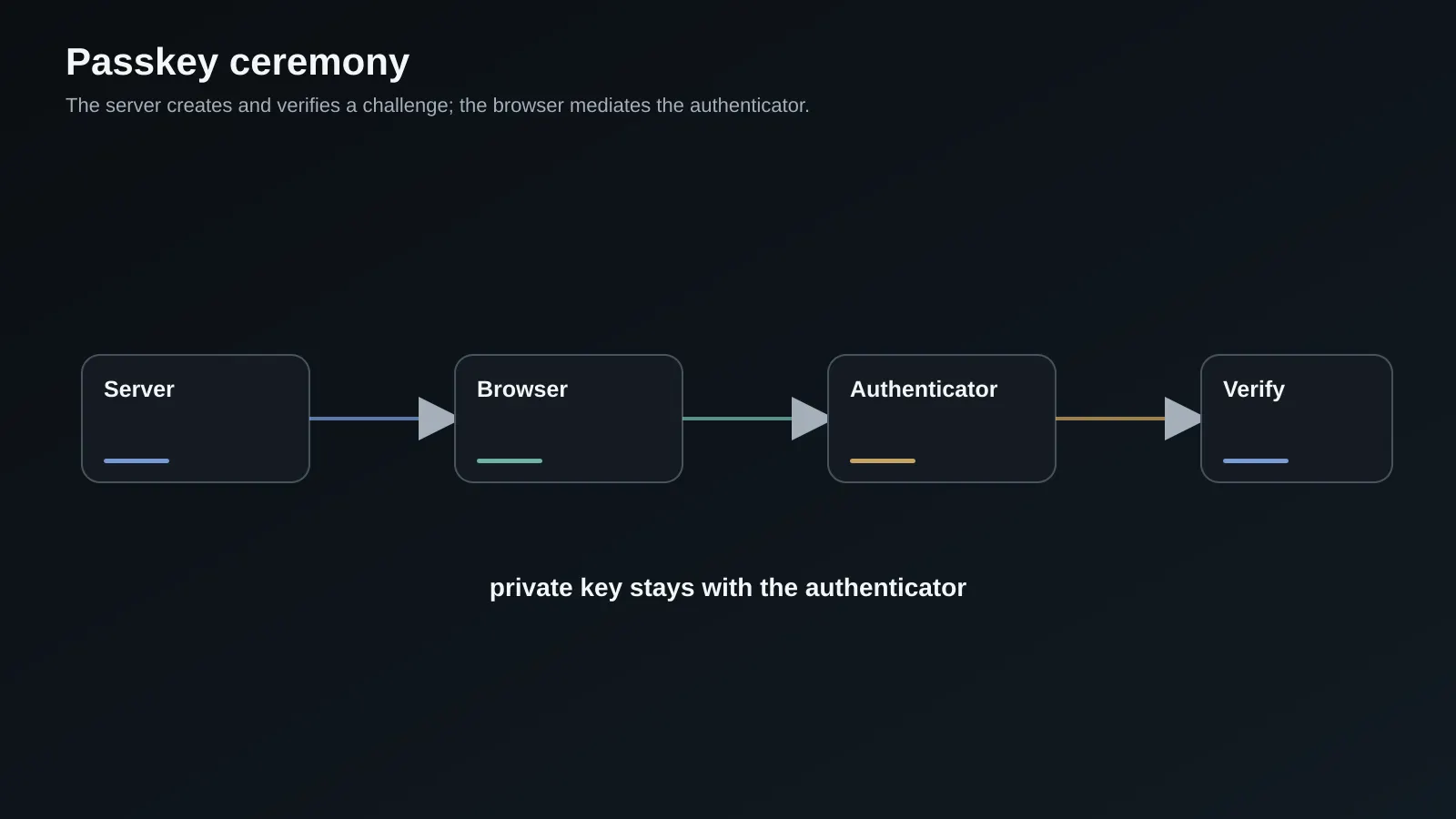
The ceremony looks like this:
server creates challenge -> browser calls WebAuthn -> authenticator verifies user
       ^                                                               |
       |                                                               v
server verifies origin, RP ID, challenge, flags, counter, and signature
       -> session or step-up decision -> audit event
The server never receives a biometric. It receives an assertion that proves possession of a private key and, depending on flags and policy, user verification. This distinction matters when explaining the system to security reviewers and enterprise buyers.
Model credentials and account ownership
Keep passkeys attached to a user identity, not directly to a tenant membership. A person may belong to several organizations, and the same credential can authenticate the person before authorization chooses a tenant. Store the credential ID, public key, sign counter, transports when useful, device label, created time, last used time, user verification policy, and revocation state.
CREATE TABLE webauthn_credentials (
  id uuid PRIMARY KEY DEFAULT gen_random_uuid(),
  user_id uuid NOT NULL REFERENCES users(id),
  credential_id bytea NOT NULL UNIQUE,
  public_key bytea NOT NULL,
  sign_count bigint NOT NULL DEFAULT 0,
  transports text[] NOT NULL DEFAULT '{}',
  label text,
  created_at timestamptz NOT NULL DEFAULT now(),
  last_used_at timestamptz,
  revoked_at timestamptz
);

CREATE INDEX webauthn_credentials_user_idx
  ON webauthn_credentials (user_id)
  WHERE revoked_at IS NULL;
The sign counter is a signal, not a universal replay detector. Some authenticators do not increment it reliably, and synced credential behavior can be different from a single hardware key. Record anomalies, do not automatically lock a customer out on every unexpected value, and use your risk policy to decide when a fresh step-up or admin review is required.
Allow multiple credentials per user. One phone, one laptop, and one hardware security key is a more resilient setup than a single credential. Let users name credentials, show last-used information, and revoke them individually. A credential management screen is a security feature because it gives users a way to recognize and remove old devices.
Implement registration safely
Registration begins with a server-generated challenge tied to the authenticated session. The server sends creation options containing the RP ID, user ID, challenge, supported algorithms, discoverable credential policy, and user-verification requirement. The browser calls navigator.credentials.create, then returns the credential to the server for verification.
With the current @simplewebauthn/server and browser packages, the code shape is similar to this. Pin a compatible library version and follow its exact API names because WebAuthn helpers evolve:
import { generateRegistrationOptions, verifyRegistrationResponse } from '@simplewebauthn/server';

export async function beginRegistration(user: User) {
  const challenge = randomBytes(32).toString('base64url');
  await challengeStore.put(`reg:${user.id}`, challenge, { ttlSeconds: 300 });

  return generateRegistrationOptions({
    rpName: 'Acme Workspace',
    rpID: process.env.WEBAUTHN_RP_ID!,
    userID: user.id,
    userName: user.email,
    challenge,
    excludeCredentials: await listCredentialDescriptors(user.id),
    authenticatorSelection: {
      residentKey: 'preferred',
      userVerification: 'required',
    },
  });
}

export async function finishRegistration(user: User, response: unknown) {
  const expectedChallenge = await challengeStore.take(`reg:${user.id}`);
  if (!expectedChallenge) throw new Error('Registration challenge expired');

  return verifyRegistrationResponse({
    response,
    expectedChallenge,
    expectedOrigin: process.env.WEBAUTHN_ORIGIN!,
    expectedRPID: process.env.WEBAUTHN_RP_ID!,
  });
}
Store the challenge server-side or in a tamper-resistant session, consume it once, and bind it to the intended user and ceremony. Never accept a challenge supplied by the browser as proof. Verify the expected origin and RP ID on the server, then persist the credential only after successful verification.
Implement authentication and step-up
Authentication is the same pattern with an assertion. The server generates a short-lived challenge, the browser calls navigator.credentials.get, and the server verifies the challenge, origin, RP ID, signature, user handle, flags, and sign counter against the stored credential. On success, issue your normal session with the appropriate tenant and role claims.
Do not make every action rely on the initial login assurance. Require a fresh assertion for changing payout details, exporting sensitive data, changing SSO policy, adding an admin, or disabling security controls. Store an authentication assurance timestamp in the session and make sensitive route handlers enforce it server-side.
export async function finishAuthentication(
  user: User,
  credential: StoredCredential,
  response: unknown,
) {
  const expectedChallenge = await challengeStore.take(`auth:${user.id}`);
  if (!expectedChallenge) throw new Error('Authentication challenge expired');

  const result = await verifyAuthenticationResponse({
    response,
    expectedChallenge,
    expectedOrigin: process.env.WEBAUTHN_ORIGIN!,
    expectedRPID: process.env.WEBAUTHN_RP_ID!,
    credential: {
      id: credential.credentialId,
      publicKey: credential.publicKey,
      counter: credential.signCount,
      transports: credential.transports,
    },
    requireUserVerification: true,
  });

  await updateCredentialCounter(credential.id, result.authenticationInfo.newCounter);
  return createSession(user.id, { assurance: 'passkey', stepUpAt: new Date() });
}
Use the exact verification return fields for the library version you install. Add replay tests for expired, reused, wrong-origin, wrong-RP, wrong-user, and altered-signature responses. An authentication route that returns a generic error to the client should still emit a specific internal reason for operations and incident response.
Choose RP ID and hostname strategy
RP ID scope is an architectural decision. A credential created for example.com may be usable on eligible subdomains, while a credential scoped to login.example.com is narrower. Choose a stable production domain rather than a temporary preview hostname. Keep the browser origin exact, including scheme and port, and never accept a broad wildcard in verification.
For a multi-tenant SaaS, decide whether all tenants use one app domain, custom domains, or an identity subdomain. Custom domains create a new RP ID problem because credentials are scoped to the domain where they are created. You may need a central login origin, a tenant-specific credential strategy, or a product decision that passkeys are enrolled only on the canonical account domain.
Write the policy down before coding. Include production, local development, preview, mobile webviews if supported, and admin tools. A browser can show a passkey prompt and still fail server verification if the origin or RP ID is not exactly what the server expected.
Plan recovery before enrollment
Recovery is where passkey projects become real security projects. Users lose devices, change employers, switch credential providers, and sometimes lose access to a synced ecosystem. A recovery link sent to an old email address is not equivalent to a passkey assertion, especially for an administrator who controls billing, exports, or tenant membership.
Use recovery tiers. A lower-risk user may recover with a verified email plus an existing session and a cooling-off period. A tenant owner may require two existing admins, a previously registered hardware key, verified domain control, support review, or an out-of-band business process. State clearly which actions are blocked during recovery and notify all active admins.
Do not let recovery silently downgrade the account forever. After recovery, require the user to enroll a new credential, rotate sessions, review active devices, and confirm sensitive contact changes. Log who approved the action, what evidence was used, and which controls were temporarily relaxed. Security teams should be able to reconstruct the timeline without reading application debug logs.
Coexist with SAML, OIDC, and enterprise policy
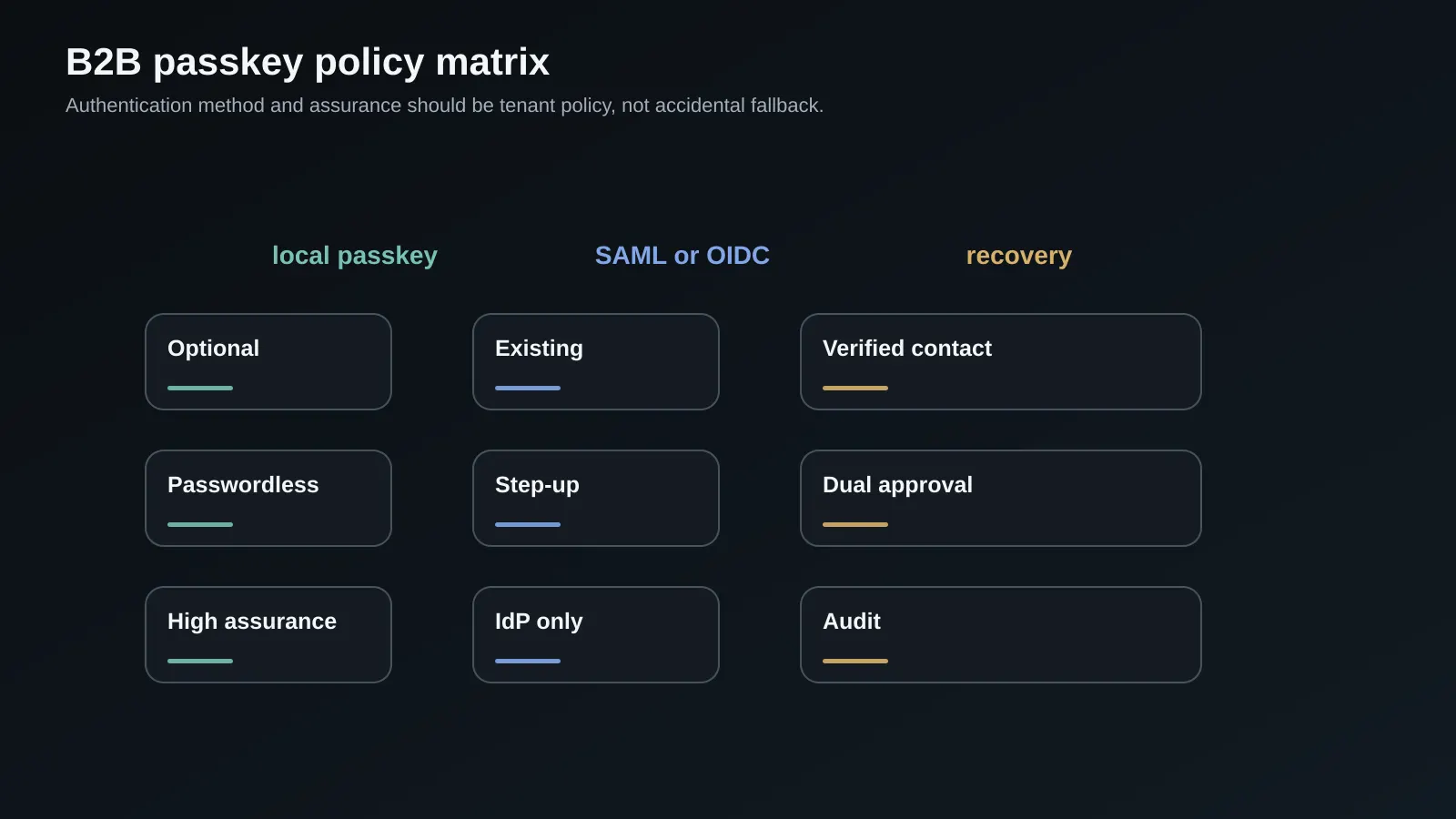
Many B2B SaaS customers already use an identity provider. Passkeys can be a direct authentication method for local accounts, a step-up factor after SSO, or an IdP-managed credential outside your product. Avoid presenting these as interchangeable without tenant policy.
| Tenant policy | Local passkey | SAML or OIDC | Recovery and admin rule |
|---|---|---|---|
| Optional | Available after password or SSO | Existing route remains | User controls enrollment |
| Passwordless local | Passkey required for local login | SSO may remain required for managed domains | Admin controls fallback |
| IdP only | Product passkey may be step-up only | Required for primary login | IdP and tenant admins own recovery |
| High assurance | UV and hardware key preferred or required | SSO plus step-up | Dual approval for policy changes |
Resolve account linking carefully. Do not link a passkey to an email address merely because the email string matches a new SSO assertion. Use verified tenant identity, domain ownership, and an explicit linking flow. The SAML SSO architecture guide is useful background for the tenant-admin side of this decision.
Roll out with telemetry and admin controls
Instrument each ceremony with a correlation ID, user and tenant identifiers that are safe for your privacy model, browser and platform class, RP ID, outcome category, latency, and whether user verification was present. Never log the challenge, credential private material, biometric information, or complete assertion payload.
Track the funnel:
- eligible users who see enrollment,
- options created,
- browser prompt opened,
- ceremony completed,
- server verification passed,
- credential used again,
- recovery or revocation events.
Segment failures by browser, platform, authenticator type, origin, and tenant policy. A broad “passkey failed” metric does not tell you whether an RP ID is wrong or a user canceled a prompt. Add an admin view that can revoke credentials, require step-up, review recovery events, and export audit records for enterprise investigations.
Design sessions, account linking, and offboarding
WebAuthn verifies an authenticator. Your application still has to create a session and decide which account and tenant the user may enter. Keep those decisions separate. After a successful assertion, resolve the user from the credential record, load current tenant membership, and issue a session with a short-lived assurance claim. Do not put stale roles or tenant lists into a long-lived token and assume the passkey proves authorization.
Account linking needs an explicit confirmation step. If a signed-in user adds a passkey, bind it to that user from the session. If a user tries to link a credential during a sign-in flow, require an existing factor or verified enterprise identity before changing account ownership. Email similarity is a hint for discovery, not proof of identity. Notify the old account and tenant admins when a new credential or recovery channel is added.
Offboarding should revoke access at more than one layer. Disable the user or membership, revoke sessions, remove or quarantine credentials, stop recovery email delivery, and preserve the audit record. For a customer-managed SSO tenant, let the identity provider disable the primary identity while your application immediately rechecks membership on sensitive requests. A passkey assertion from a former employee is still cryptographically valid, so authorization must win after authentication.
export async function createSessionFromCredential(input: {
  credentialId: Uint8Array;
  assurance: 'passkey';
}) {
  const credential = await credentials.findActive(input.credentialId);
  if (!credential) throw new Error('Credential is revoked or unknown');

  const user = await users.findActive(credential.userId);
  if (!user) throw new Error('User is disabled');

  const memberships = await memberships.listActive(user.id);
  const session = await sessions.create({
    userId: user.id,
    assurance: input.assurance,
    membershipVersion: user.membershipVersion,
    expiresInSeconds: 60 * 60 * 8,
  });

  await audit.record('passkey_login', { userId: user.id, credentialId: credential.id });
  return { session, memberships };
}
Keep the session cookie HttpOnly, Secure, and appropriately scoped. Rotate it after authentication and step-up. The passkey is a strong proof of possession, but it does not remove normal session fixation, CSRF, authorization, or revocation requirements.
Run account lifecycle drills with customer support. Create two users in one tenant, enroll credentials on several platforms, disable one user, revoke one credential, and execute recovery for the other. Verify that the disabled user cannot use an existing session or passkey, that an admin can recognize the credential, and that notifications identify the event without exposing security-sensitive details. These drills reveal workflow gaps that ceremony unit tests cannot find.
Make the recovery language precise. Tell users which evidence the support team can accept, how long a cooling-off period lasts, which actions are unavailable during review, and where to report a suspicious enrollment. Clear expectations reduce pressure on support staff to bypass the policy during an urgent account problem.
Tradeoffs and when not to do this
Passkeys reduce phishing exposure and can improve login experience, but they add platform variation and recovery design. Synced credentials are convenient and can be available across a user's devices, but their trust model differs from a hardware-bound key. Device-bound keys can provide stronger assurance while increasing loss and support risk.
Do not make passkeys mandatory for every user on day one if your recovery and support process is not ready. Do not claim that user verification automatically satisfies every regulatory MFA requirement. Confirm the assurance level required by your customers, industry, and identity provider contracts. A small optional rollout with honest telemetry is safer than a forced migration that sends users to a weak fallback.
Common failure modes
Wrong origin and RP ID are the first debugging targets. Localhost, preview, canonical app, and custom tenant domains are not interchangeable. Print the expected values in safe server diagnostics and test each environment.
Teams also store a credential without binding it to the right user, or they use an email address as the only account link. Use the authenticated session, verified user handle, and tenant policy. Another failure is not consuming challenges, allowing a replay window.
Recovery is often shipped as a generic magic link with no cooling-off period or admin notification. That creates a bypass around the passkey. Finally, organizations forget revocation. A user who leaves the company must have the credential removed or the account disabled, and a tenant admin must have a visible way to do it.
Production readiness checklist
- RP ID, origin, environment, and custom-domain behavior are documented.
- Challenges are random, short-lived, bound to the session and ceremony, and consumed once.
- Registration and authentication verify challenge, origin, RP ID, flags, user, signature, and counter.
- Multiple credentials per user are supported with labels, last-used data, and individual revocation.
- Credential records, audit events, and PII access follow the storage and retention policy.
- Step-up authentication protects high-impact account and tenant operations.
- Recovery tiers match the risk of the account and notify affected admins.
- SAML, OIDC, local login, account linking, and managed-domain rules are tested together.
- Ceremony outcomes are observable without logging secrets or assertion payloads.
- Support has scripts and runbooks for platform-specific failures.
- A staged rollout and a clear fallback exist before making passkeys required.
Frequently Asked Questions
Are passkeys the same as biometrics?
No. A passkey is a public-key credential. The device may use a fingerprint, face scan, PIN, or local unlock to authorize the private key, but the biometric is not sent to your server. The server verifies a signed assertion and the authenticator flags. This distinction means passkeys can work on devices without biometrics while still offering phishing-resistant authentication.
Should a B2B SaaS require discoverable credentials?
Discoverable credentials, also called resident credentials, make usernameless sign-in possible and generally improve the passkey experience. They are not the only design. A product with strict enterprise account discovery may first identify the tenant or email domain, then request an assertion. Choose the credential and user-verification policy based on account discovery, shared devices, tenant controls, and the login experience you can support.
How should recovery work when a user loses every device?
Use a risk-based process rather than one universal link. For ordinary users, a verified contact plus a delay and session review may be acceptable. For tenant owners and administrators, require stronger evidence such as other admins, hardware keys, domain control, or documented support approval. After recovery, revoke old sessions, enroll a new credential, notify admins, and record the evidence used.
Can passkeys replace enterprise SSO?
Usually they complement it. A tenant may require SAML or OIDC for primary identity while allowing a passkey for step-up, or it may let local users authenticate directly. The product should make tenant policy explicit and avoid automatically linking identities by email. Enterprise customers may prefer passkey management in their IdP, while a product-owned credential store can serve smaller accounts.
Do synced passkeys have the same assurance as hardware keys?
Not automatically. Synced credentials provide availability across a provider ecosystem and can be very strong against phishing, but their lifecycle and administrative controls differ from device-bound hardware keys. If a customer needs higher assurance, support hardware keys or an enterprise IdP policy and communicate the distinction. Never represent every passkey as the same assurance level.
Need help building this in production?
SoftwareCrafting is a full-stack dev agency - we ship fast, scalable React, Next.js, Node.js, React Native & Flutter apps for global clients.
Get a Free ConsultationConclusion and next steps
The WebAuthn ceremony is the straightforward part of a passkey project. The durable product is the surrounding system: credential records, RP and origin policy, step-up enforcement, recovery, SSO coexistence, auditability, and support operations.
Start with one tenant cohort, record ceremony outcomes, and review recovery paths before increasing enforcement. Then compare the pragmatic authentication architecture guide with your current identity boundary and update the OIDC implementation plan for the same tenants.