

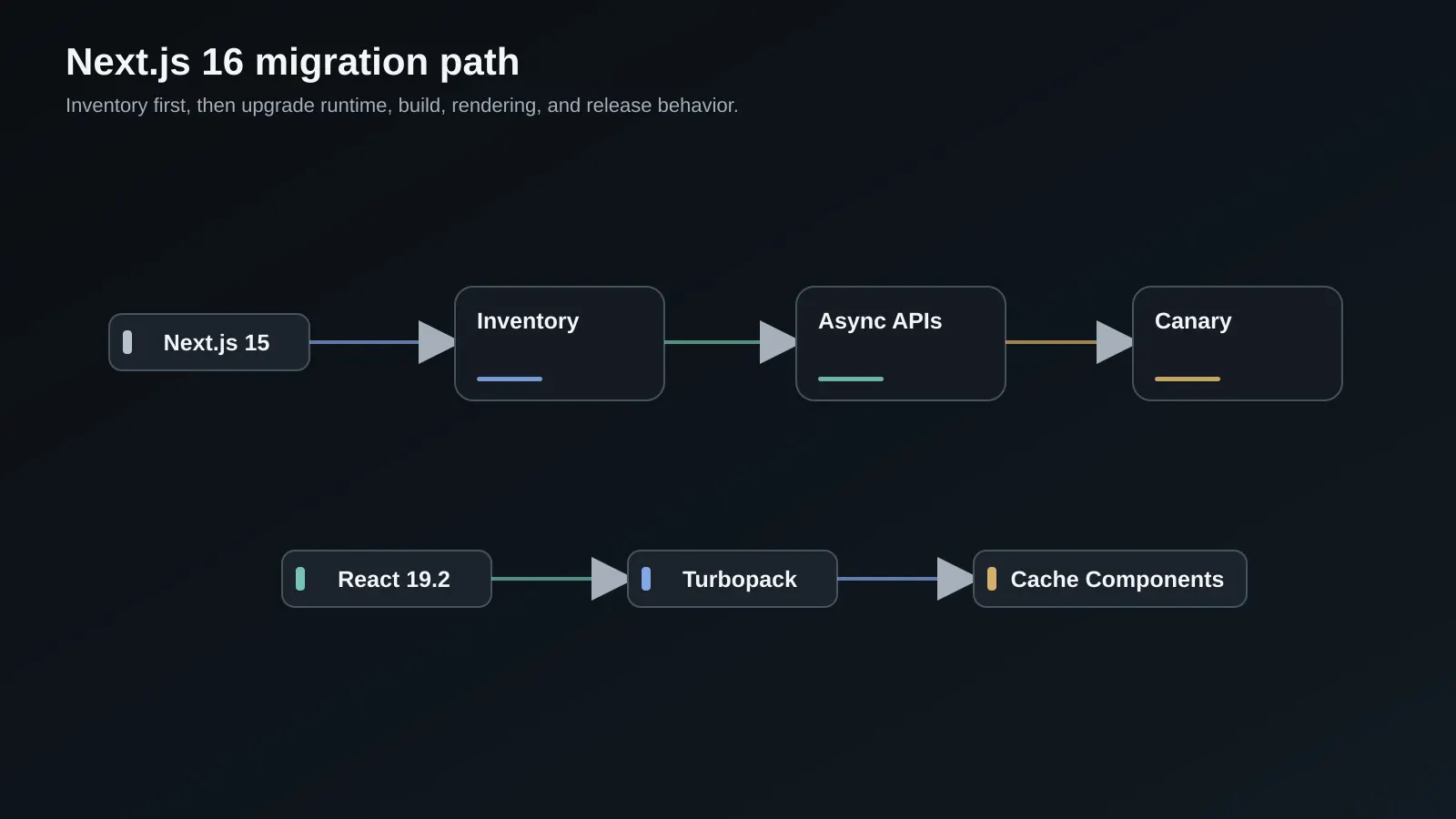
TL;DR: Treat the Next.js 16 upgrade as a behavior change project, not a dependency edit. Inventory Node, React, request APIs, custom webpack loaders, caching assumptions, and deployment runtime first. Run the official codemods, move synchronous request access to
await, make Cache Components an explicit decision, validate Turbopack against your real build, and release behind a canary with a rollback artifact ready.
Why this matters in 2026
Next.js 16 is a meaningful platform upgrade for App Router applications. Turbopack is now the default bundler for development and production builds, React 19.2 is the supported React line, and several experimental or transitional configuration names have become clearer. The upgrade can shorten feedback loops and make rendering behavior easier to reason about, but it also exposes assumptions that older applications have been carrying quietly.
The risky assumptions are usually not in the version number. They live in a helper that reads cookies() without awaiting it, a custom webpack loader that was never covered by a production build, a page that assumes every request is dynamic, or a deployment image that still runs Node 18. These changes can pass a developer's homepage test and fail only on a tenant route, an authenticated request, or the first cold build in CI.
The official Next.js 16 release notes describe the major platform changes, while the version 16 upgrade guide lists the codemods and runtime requirements. Use those documents as the compatibility source of truth, then use this runbook to turn them into an application-level rollout.
Key terms and mental model
Think of the migration as four contracts that must remain intact:
| Contract | What changes in Next.js 16 | What you must prove |
|---|---|---|
| Build contract | Turbopack is the default and custom webpack configuration can block it | A clean production build uses the intended bundler and emits equivalent assets |
| Request contract | Request-bound APIs such as params, cookies, and headers are asynchronous | Every access is awaited at the correct server boundary |
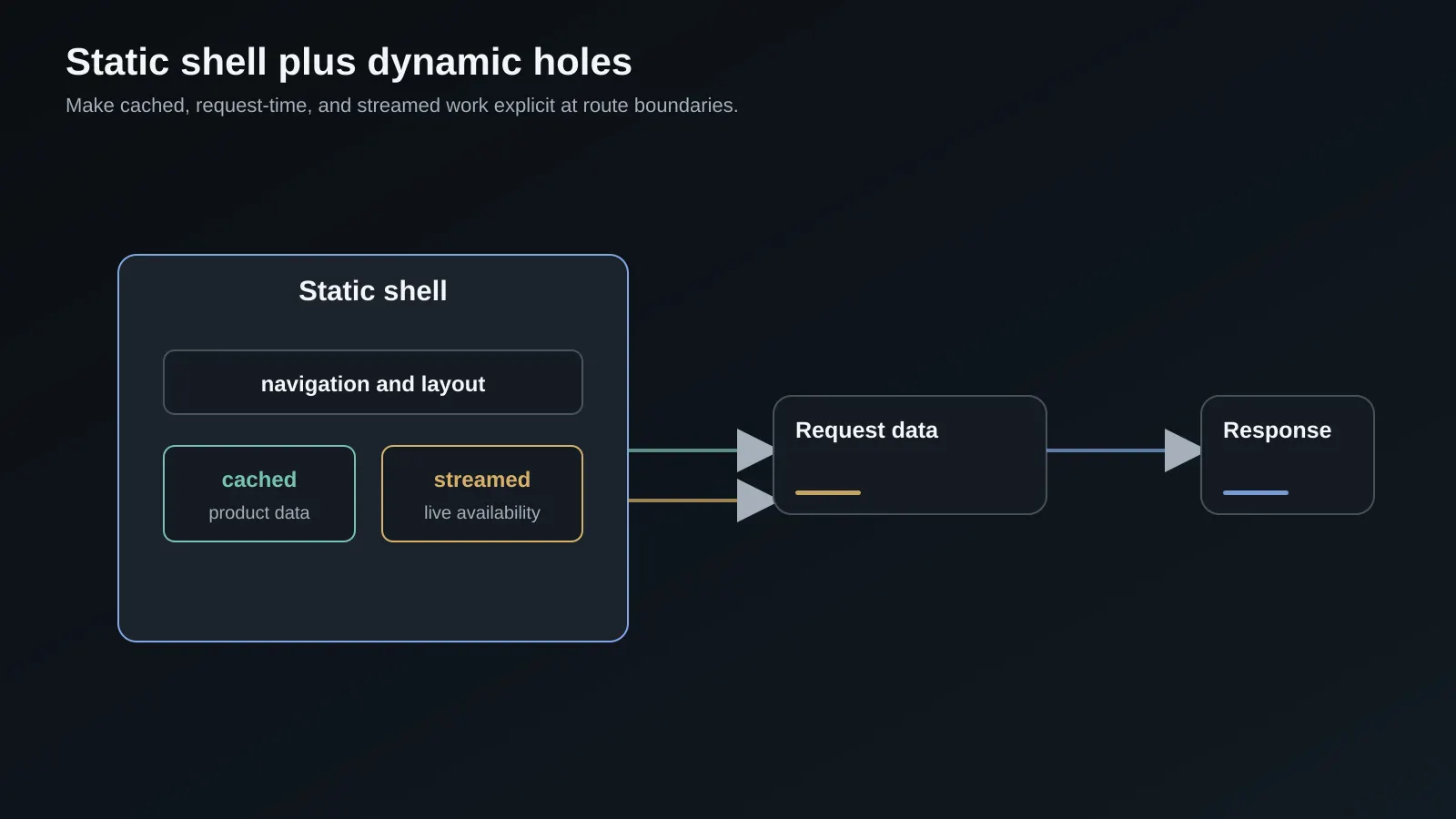
| Rendering contract | Cache Components and partial prerendering make static shells and dynamic holes explicit | Users see the same authorization and freshness behavior as before |
| Runtime contract | Node, React, Proxy, and deployment behavior have minimums and new defaults | Local, CI, preview, and production runtimes are aligned |
The mental model is simple: first preserve correctness, then adopt new performance behavior. A faster bundler is valuable only if the emitted application has the same route, auth, cache, and error semantics. Keep the upgrade in separate commits when possible so a regression has a narrow cause.
Inventory the application before changing versions
Start with a baseline commit and record current build time, route output, bundle size, Core Web Vitals, error rate, cache hit behavior, and the Node version used by each environment. Save the output of next build, not only the elapsed time. You need a comparison for route generation, warnings, static versus dynamic classification, and server bundles.
Search for the APIs and configuration that commonly need work:
node --version
pnpm why next react react-dom
rg "cookies\(|headers\(|draftMode\(|params:|searchParams:" app src
rg "experimental_ppr|experimental\.turbo|webpack\(|middleware\.ts" .
pnpm exec next info
pnpm build 2>&1 | tee artifacts/next-15-build.txt
Classify each match instead of applying a blind replacement. A params prop in a type declaration may describe a local domain object rather than the App Router API. A webpack configuration may only add an alias that Turbopack already supports. A middleware file may have edge-specific dependencies that cannot simply move to the Node runtime.
Record the deployment facts in the pull request: Node image tag, package manager version, lockfile hash, hosting adapter, environment variables, and whether the application uses a custom server. Next.js 16 requires Node 20.9 or newer. Make that a checked invariant in CI rather than a tribal expectation on developers' machines.
Establish the runtime and dependency floor
Upgrade the framework and React versions in one controlled branch, then regenerate the lockfile with the package manager used by CI. Do not mix a framework migration with a broad dependency refresh. If the application has native packages, image tooling, or a custom server, change those in separately reviewable commits.
{
  "engines": {
    "node": ">=20.9.0"
  },
  "scripts": {
    "dev": "next dev",
    "dev:webpack": "next dev --webpack",
    "build": "next build",
    "build:webpack": "next build --webpack",
    "start": "next start",
    "lint": "eslint .",
    "type-check": "tsc --noEmit"
  },
  "dependencies": {
    "next": "^16.1.6",
    "react": "^19.2.0",
    "react-dom": "^19.2.0"
  }
}
The exact patch versions should follow your lockfile policy and hosting support. Keep the explicit webpack scripts temporarily. They give you a comparison path while you migrate unsupported loaders, and they let a release branch roll back the bundler without reverting the entire framework upgrade.
Run type checking and linting before the first codemod. The compiler diagnostics frequently reveal request API usage in shared components, while lint rules expose hooks or purity issues that become more visible once the build pipeline changes. A clean baseline prevents you from attributing old warnings to Next.js 16.
Migrate the asynchronous request APIs
Next.js 16 expects request-bound values to be consumed asynchronously. In a page, params and searchParams are promises. The same principle applies to cookies(), headers(), and draftMode(). The reason is architectural: request data may be resolved at a boundary that supports streaming and dynamic rendering, so treating it as an immediately available object creates an invalid rendering assumption.
The safe pattern is to await at the narrowest server boundary and pass plain values to children:
type PageProps = {
  params: Promise<{ team: string; project: string }>;
  searchParams: Promise<{ tab?: string }>;
};

export default async function ProjectPage({ params, searchParams }: PageProps) {
  const [{ team, project }, { tab = 'overview' }] = await Promise.all([params, searchParams]);

  const projectData = await getProject({ team, project });

  return (
    <ProjectLayout project={projectData} activeTab={tab}>
      <ProjectTabs team={team} project={project} activeTab={tab} />
    </ProjectLayout>
  );
}
Promise.all is useful when independent request values and data can resolve together. Do not await params, then await searchParams, then start the database query if those operations do not depend on each other. Conversely, do not parallelize authorization with data loading when authorization is required to construct the data query.
Run the official next-async-request-api codemod, then inspect every changed file. Codemods can convert obvious cases but cannot understand whether a wrapper hides a request API, whether a component should become async, or whether a cache boundary changes the security model. Add a regression test for authenticated and unauthenticated requests on every route that uses request data.
Decide how to use Turbopack
Turbopack is the default in Next.js 16 for next dev and next build. The Turbopack configuration documentation explains the top-level turbopack option and the supported loader surface. The most important migration question is not whether Turbopack is fast on a sample app. It is whether your actual configuration, monorepo boundaries, CSS pipeline, code generation, and test fixtures are supported.
Applications with a custom webpack function should expect the default build to fail until that configuration is migrated or removed. Try the built-in behavior first. Then move simple aliases and extension rules into turbopack.resolveAlias or turbopack.resolveExtensions. Replace loader-only transformations with a framework-native solution where possible. If a loader is essential and unsupported, keep a deliberate webpack build while you isolate the dependency.
Compare more than elapsed time:
| Measurement | Why it matters | Acceptable result |
|---|---|---|
| Cold production build | Catches loader and monorepo incompatibility | Completes with no new warnings or missing modules |
| Warm local rebuild | Measures daily developer feedback | Faster or at least no worse for common routes |
| Client asset graph | Detects accidental client dependency expansion | Route chunks remain within the baseline budget |
| Server output | Detects changed dynamic behavior | Auth and cache classification is intentional |
| Source maps and error stacks | Protects incident response | Errors remain actionable in staging |
Use next dev --webpack only as a temporary escape hatch. If both build systems remain in your pipeline, document which one is authoritative. Two different bundlers can produce different module resolution and CSS behavior, which makes a green webpack build a weak substitute for a green Turbopack build.
Make Cache Components an explicit rendering choice
Next.js 16 removes the old experimental PPR switch in favor of Cache Components. The change is not merely a rename. You should decide which work is cached, which work is request-time, and which work is allowed to stream into a static shell. The Next.js caching documentation should be read alongside route-specific tests because cache policy is part of application correctness.
Start with a route map. For each page, write down the static frame, cacheable data, request-bound data, and invalidation event. A public catalog may cache product metadata but stream inventory availability. A dashboard may cache navigation and permissions metadata for a short period but keep account balances request-time. Never cache a response that includes tenant or user data unless the cache key and invalidation model explicitly include that identity.
import { cacheLife } from 'next/cache';

async function getProductSummary(productId: string) {
  'use cache';
  cacheLife('hours');

  return db.product.findUniqueOrThrow({
    where: { id: productId },
    select: { id: true, name: true, description: true, price: true },
  });
}

export default async function ProductPage({ params }: { params: Promise<{ productId: string }> }) {
  const { productId } = await params;
  const product = await getProductSummary(productId);
  const availability = await getLiveAvailability(productId);

  return <ProductView product={product} availability={availability} />;
}
The example separates long-lived product data from live availability. Before using a cache directive, confirm that the function has no hidden access to cookies, headers, request IDs, or mutable process state. Add invalidation tests and log the cache key shape in a non-production environment. A cache hit that is fast and wrong is worse than a cache miss.
Account for Proxy, after, and runtime behavior
Next.js 16 renames middleware to Proxy. The rename is a useful signal that the file runs before routing and should remain focused on request interception, redirects, rewrites, and lightweight policy. It is not a good place for database reads, large authorization graphs, or work that must finish before the response can be useful.
The new after() API is designed for work that can run after a response or navigation has completed, such as analytics delivery or log flushing. Treat it as best-effort background work. It should not be the only place a payment, audit record, entitlement update, or security event is persisted. If the work is required, enqueue it durably before returning the response.
Audit edge compatibility. A package that uses Node's filesystem, native crypto bindings, TCP sockets, or a Node-only SDK may work in a route handler and fail in Proxy. Declare the runtime intentionally for server routes, and exercise the deployed runtime in preview. This is also a reason to keep an API gateway or backend boundary explicit when an application is outgrowing framework-owned request interception. Our backend development and API services can help separate edge policy from domain processing during this migration.
Test and release the migration in stages
Use a three-stage release. Stage one runs unit, type, integration, and production-build checks in CI. Stage two deploys a preview with synthetic authenticated sessions, representative tenant data, and browser coverage. Stage three sends a small percentage of real traffic to the new build while comparing route errors, cache behavior, latency, and Core Web Vitals to the control.
name: next-migration
on: [pull_request]
jobs:
  verify:
    runs-on: ubuntu-latest
    steps:
      - uses: actions/checkout@v4
      - uses: pnpm/action-setup@v4
        with:
          version: 10
      - uses: actions/setup-node@v4
        with:
          node-version: 22
          cache: pnpm
      - run: pnpm install --frozen-lockfile
      - run: pnpm type-check
      - run: pnpm lint
      - run: pnpm build
      - run: pnpm test -- --runInBand
Add route probes for a public page, a redirect, a not-found page, an authenticated page, a mutation, a streamed response, and a page with search parameters. Capture response headers and body markers. Visual snapshots should cover loading states because streaming can alter when a skeleton, fallback, or dynamic section appears.
Baseline field data before release. The existing App Router Core Web Vitals checklist provides a useful measurement workflow. During the canary, compare p75 LCP, INP, and CLS by route, device class, deployment version, and cache state. A faster build does not automatically produce a faster page.
Keep a migration ledger for decisions that may otherwise disappear in review comments. Record every temporary webpack exception, async API wrapper, cache directive, runtime declaration, and observed warning. Give each item an owner and a removal condition. Six weeks after launch, review the ledger with error and performance data. Temporary compatibility code is safe when it is visible, bounded, and scheduled for deletion; it becomes dangerous when nobody remembers why it exists.
Tradeoffs and when not to do this
Do not rush the upgrade solely for a benchmark headline. An application with a heavily customized webpack graph, unmaintained native dependency, or fragile release process may gain more from a smaller preparatory refactor. Keep the old framework version while you make the app's runtime contracts explicit if the business cannot tolerate a broad change window.
Turbopack can reduce build time, but not every webpack loader or plugin has a direct equivalent. Cache Components can improve time to useful content, but it forces you to confront data ownership and invalidation. Async request APIs make boundaries clearer, but they require changes in shared types and test fixtures. Proxy can simplify naming, but it does not make edge execution suitable for arbitrary backend work.
Common failure modes
The most common failure is a partially migrated request API. A page awaits params, but a helper still calls cookies() synchronously. Search for the entire call chain and make the helper async rather than hiding the promise behind an unsafe cast.
Another failure is validating only the home page. Build every route with representative values, including dynamic segments that are absent from local fixtures. Confirm tenant isolation with two users and two organizations. Cache bugs often look like authentication bugs because the wrong user's result is served quickly.
Teams also miss the deployment image. Local Node 22 passes while CI uses an older base image. Pin the image, print the runtime in the build log, and make the minimum version fail fast. Finally, do not keep a silent webpack fallback. An undocumented fallback can let a release appear healthy while production and developer builds use different module graphs.
Production readiness checklist
- Node 20.9 or newer is enforced in local, CI, preview, and production environments.
- React and React DOM are on the supported React 19.2 line.
- The official upgrade codemod has run and every changed file has been reviewed.
-
params,searchParams,cookies,headers, anddraftModeare awaited at safe boundaries. - Turbopack completes the real production build, or the webpack exception is documented with an owner.
- Cache Components decisions identify static, cached, and request-time data for each critical route.
- Proxy code is lightweight and compatible with its selected runtime.
- Required background work is durable and does not depend only on
after(). - Auth, tenant isolation, redirects, not-found routes, streaming, and mutations have probes.
- Canary dashboards compare errors, latency, cache behavior, and Core Web Vitals to the baseline.
- A previous image, lockfile, and deployment configuration can be restored quickly.
Frequently Asked Questions
Is Next.js 16 a breaking upgrade for every App Router application?
No. The amount of work depends on the APIs and configuration your application uses. A small App Router application with no custom webpack setup may upgrade with a short codemod and test cycle. A monorepo with custom loaders, synchronous request helpers, edge-only middleware dependencies, or implicit cache assumptions needs a deeper migration. Treat the upgrade guide as a checklist of possible changes, then use your route inventory and build output to decide what actually applies.
Can I keep webpack after upgrading to Next.js 16?
Yes, as a deliberate transition. Next.js 16 provides --webpack options for development and builds. Keeping webpack is reasonable while you replace an unsupported loader or investigate a compatibility issue, but it should be visible in scripts and tracked as migration debt. Run the default Turbopack build regularly so the application does not drift further from the supported default.
Should every page enable Cache Components immediately?
No. Caching is an application policy, not a badge of framework adoption. Start with public, stable data whose freshness and invalidation rules are clear. Keep personalized, permission-sensitive, or rapidly changing data request-time until you can prove the cache key and invalidation behavior. A carefully dynamic page is safer than a fast page that leaks data between users.
What is the safest rollback if a canary fails?
Keep the previous container or deployment artifact available, along with its lockfile and environment contract. Route traffic back to that artifact rather than trying to downgrade dependencies in place. Preserve logs and request samples from the failed canary, then reproduce the issue with the same Node image and build output. If the failure is isolated to Turbopack, the explicit webpack build can be a temporary recovery path, but verify it against the same test suite.
How should I measure whether the migration improved performance?
Separate build performance from user performance. Measure cold and warm build time, developer rebuild time, emitted asset sizes, server response latency, and real-user Core Web Vitals. Segment the field data by route, device, geography, cache state, and deployment version. A build that is 30 percent faster is useful, but it does not justify a migration if authenticated navigation, interaction latency, or error rates regress.
Need help building this in production?
SoftwareCrafting is a full-stack dev agency - we ship fast, scalable React, Next.js, Node.js, React Native & Flutter apps for global clients.
Get a Free ConsultationConclusion and next steps
Next.js 16 rewards teams that make hidden contracts explicit. Start with a baseline, update the runtime floor, migrate asynchronous request access, validate Turbopack on the real graph, and choose cache behavior route by route. Then release through a canary with a tested rollback.
For the next work session, compare this runbook with the App Router performance checklist, review predictable cache revalidation, and write down the three routes that would be hardest to recover if their rendering semantics changed.