

TL;DR: Do not turn an old React Native application into a New Architecture application in one jump. Inventory native dependencies, lock React Native and Expo compatibility, upgrade through a testable ladder, enable bridgeless and Fabric only when native modules are ready, and use device-farm, release, and rollback gates. The current React Native line is moving quickly, so your upgrade plan must be tied to a tested version matrix rather than a blog post from last year.
Why this matters in 2026
React Native 0.87 was released in August 2026, while Expo SDK 57 aligns with React Native 0.86.3. The current ecosystem is not waiting for applications that remain on a 0.7x release. New Android tooling, iOS build requirements, JavaScript engine changes, security patches, store requirements, and dependency releases increasingly assume the New Architecture.
The React Native release blog shows how quickly the support line moves. React Native 0.82 was the first release entirely on the New Architecture, and the default has been New Architecture since 0.76. Expo SDK 57 also changes prebuild behavior and aligns with React 19.2. The exact target version depends on your native modules and release constraints, but staying indefinitely on the legacy bridge creates a growing compatibility tax.
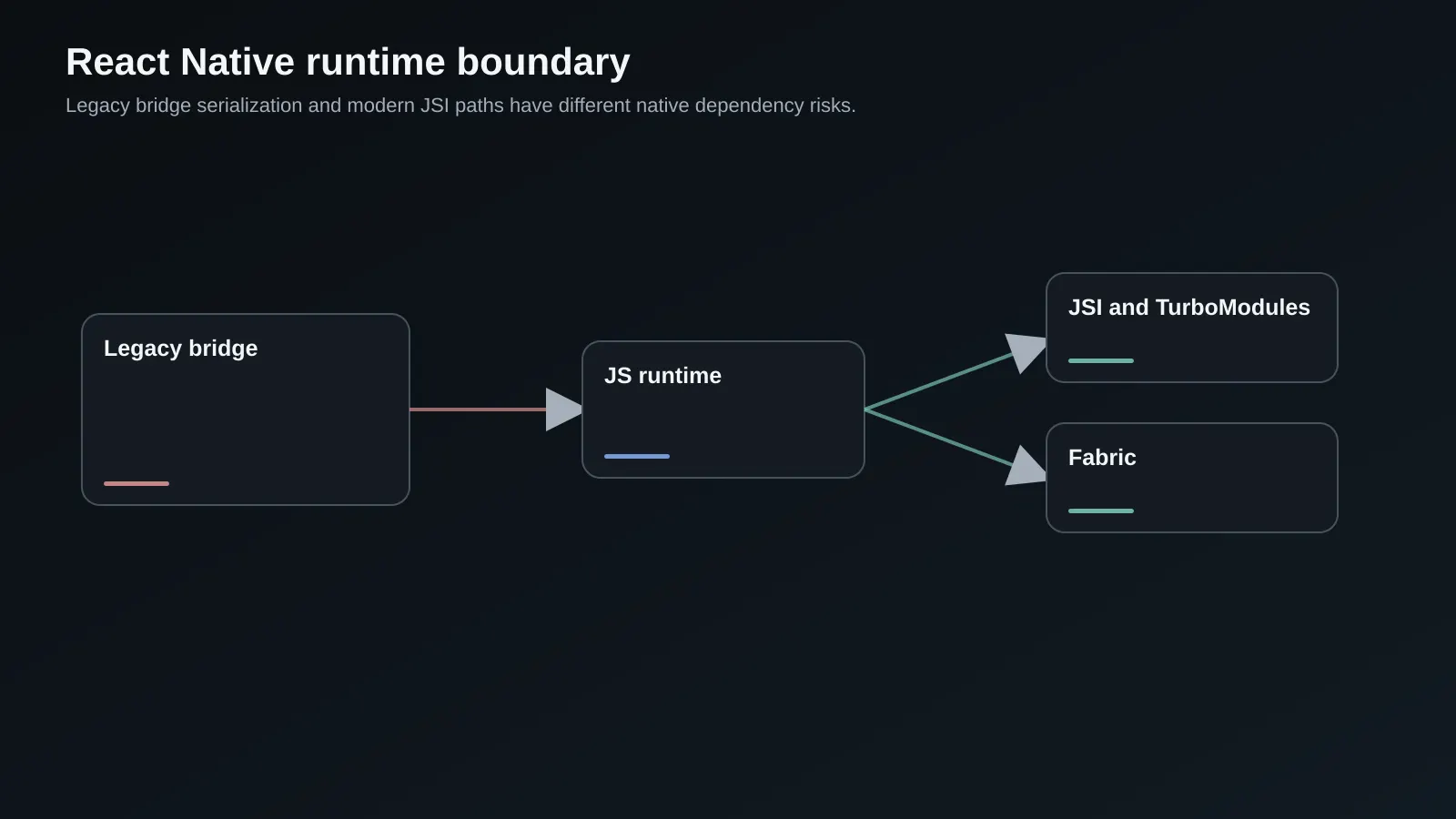
The migration is not just a JavaScript version bump. It crosses Gradle, Xcode, CocoaPods, Hermes, Metro, C++ or Swift and Kotlin modules, native view managers, animation libraries, permissions, push notifications, analytics, and CI signing. A staged plan makes failures attributable and gives product teams a safe way to keep shipping.
Key terms and mental model
| Term | Legacy path | New Architecture path |
|---|---|---|
| Bridge | Serialized asynchronous messages between JS and native | JSI and generated bindings reduce serialization boundaries |
| Fabric | Legacy UIManager and view manager path | Concurrent-capable rendering and modern native component integration |
| Native module | Bridge module with exported methods | TurboModule with generated typed specification and bindings |
| Bridgeless | Bridge runtime remains central | App runs without the legacy bridge where supported |
| Expo prebuild | Generates native projects from config | Reconciles native projects and can clean them by default in SDK 57 |
The practical mental model is a dependency graph, not a single switch:
React Native target -> React and Hermes -> Metro and Babel -> Android and iOS toolchains
                   -> Fabric and bridgeless runtime -> native modules and view managers
                   -> release pipeline, device matrix, crash and performance telemetry
The New Architecture landing page explains the runtime goals, but it also warns that enabling the architecture does not automatically make every app faster. Your bottleneck may be JavaScript startup, image decode, layout, native I/O, or a third-party SDK rather than the bridge.
Build the compatibility inventory
Before changing react-native, list every package with native code and classify its architecture support. Include direct dependencies, transitive packages with autolinking, pods, Gradle plugins, custom Swift or Kotlin code, C++ code, and scripts that patch native files.
npx react-native config > artifacts/react-native-config.json
npx react-native info > artifacts/react-native-info.txt
npx expo doctor
pnpm why react-native react react-native-reanimated hermes-engine
rg "RCTBridge|NativeModules|UIManager|requireNativeComponent|TurboModule|Fabric" .
rg "pod '|'use_frameworks!|newArchEnabled|fabric_enabled" ios android app.json app.config.*
For each package, record the current version, target version, architecture status, last release, native platforms, and owner. “Works on New Architecture” can mean that the package has a compatible release, that it works only through an interop layer, or that no one has tested the production path. Treat those as different confidence levels.
Pay special attention to libraries that touch view measurement, animations, storage, camera, maps, notifications, background tasks, and authentication. They often fail in ways that a basic navigation test will not expose. Make the inventory an artifact checked into the upgrade branch so a future React Native bump starts from evidence.
Choose the upgrade ladder
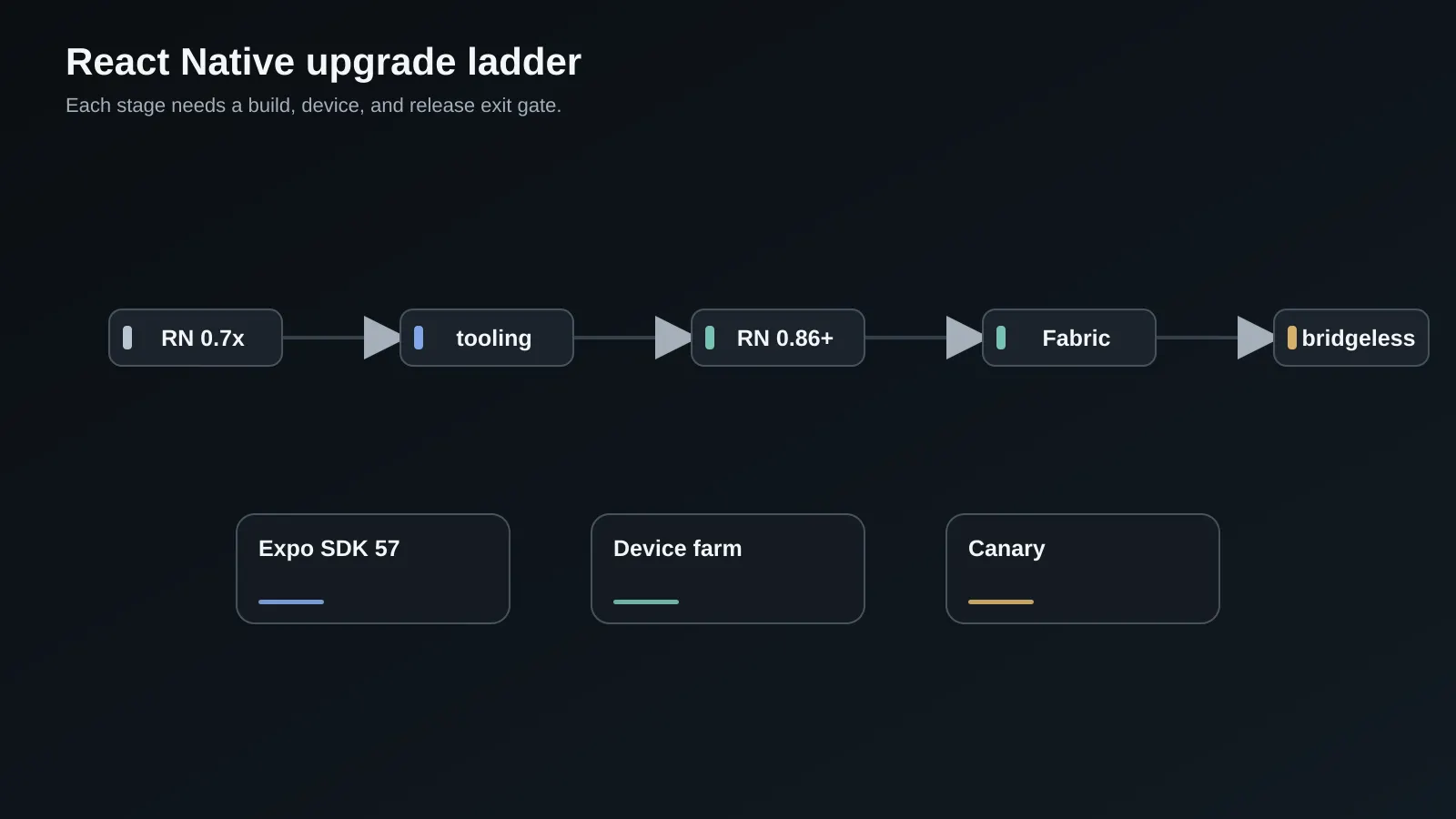
Use the smallest sequence that keeps each step buildable. An old app may need several intermediate releases because Gradle, CocoaPods, Android API levels, and React versions move together. Do not skip a version only because the JavaScript diff looks small.
| Stage | Change | Exit gate |
|---|---|---|
| 0 | Freeze baseline and create release artifact | Crash-free launch and core flow metrics recorded |
| 1 | Upgrade tooling and patch releases | Android and iOS CI builds are reproducible |
| 2 | Move to a supported React Native line | Navigation, auth, storage, push, and deep links pass |
| 3 | Align Expo SDK or bare native projects | Prebuild and native diffs are reviewed |
| 4 | Enable New Architecture with interop | Critical device and native-module matrix is green |
| 5 | Migrate high-value custom modules to TurboModules or Fabric | No legacy dependency remains in critical paths |
| 6 | Enable bridgeless where supported | Startup, memory, crash, and release gates pass |
If you are on Expo, decide whether to move with SDK releases or eject into a bare workflow. Expo SDK 57 uses React Native 0.86.3 and React 19.2, and its prebuild behavior can remove and regenerate native directories unless you use the documented no-clean option. Commit generated changes and review them like code. If you are bare, the upgrade helper is useful, but native diffs still need human review.
Align React Native, React, Expo, and engines
Do not upgrade React Native independently of React, Hermes, Metro, TypeScript, Java, Kotlin, Gradle, Android Gradle Plugin, Xcode, and CocoaPods. The supported matrix is part of the release. Capture it in a document and make CI fail when a developer uses an unsupported engine.
{
  "dependencies": {
    "expo": "^57.0.17",
    "react": "19.2.0",
    "react-native": "0.86.3",
    "react-native-reanimated": "^4.5.0"
  },
  "engines": {
    "node": ">=22.0.0"
  },
  "scripts": {
    "doctor": "expo doctor",
    "android:release": "eas build --platform android --profile production",
    "ios:release": "eas build --platform ios --profile production"
  }
}
The versions above illustrate an Expo SDK 57 line, not a universal target. A bare React Native 0.87 application has a different compatibility matrix. Use the current React Native and Expo release documentation for your selected target, and keep the target fixed for the migration branch so a new patch release does not change the problem while you are debugging it.
Enable the New Architecture behind a branch gate
Start with interop if the release supports it. The purpose is to expose incompatible native modules while leaving the product surface available. Enable the architecture in a dedicated branch or build profile, then run the same test suite against legacy and new artifacts.
# android/gradle.properties for a bare app during the pilot
newArchEnabled=true
hermesEnabled=true
For Expo, use the app configuration supported by the SDK rather than editing generated files by hand. Verify the result in the native project after prebuild. A configuration flag can be correct while a custom build script or native dependency silently disables the expected runtime.
Test cold launch, warm launch, navigation transitions, keyboard and focus behavior, layout measurement, animations, list scrolling, deep links, background and foreground transitions, push notification taps, permissions, camera, and authentication. Fabric-related issues often appear in measurement and layout, while TurboModule issues appear as missing methods, type mismatches, or initialization races.
Migrate native modules deliberately
Do not convert every native module before the application can run. Rank modules by product criticality, bridge traffic, maintenance risk, and New Architecture support. Replace an unmaintained package when a supported alternative has a lower total risk. Wrap a volatile vendor SDK behind your own interface so the rest of the app does not depend on its generated types.
A TurboModule specification makes the native contract explicit. A simplified shape looks like this:
import type { TurboModule } from 'react-native';
import { TurboModuleRegistry } from 'react-native';

export interface Spec extends TurboModule {
  getDeviceAttestation(): Promise<string>;
  clearCachedToken(): void;
}

export default TurboModuleRegistry.getEnforcing<Spec>('DeviceSecurity');
Generate the native bindings with the Codegen configuration required by your React Native target. Keep methods small, typed, and asynchronous when they touch I/O. Do not expose a large untyped object that recreates the old bridge as a new module. Add tests for missing native registration, version skew, promise rejection, background use, and repeated initialization.
For Fabric view managers, define props and events explicitly and test measurement, accessibility, layout direction, dynamic type, and unmount cleanup. A view that looks correct in a static screenshot can still leak listeners or render incorrectly while a parent resizes.
Make CI and device coverage part of the migration
Your laptop is not the test environment. Build Android and iOS release artifacts in CI, use clean caches periodically, and run a device or emulator matrix that includes low-memory Android, recent Android, an older supported iPhone, a current iPhone, and the devices that drive your real usage. Add a simulator or emulator path for deep links, push, permissions, and interrupted background work.
Track native build time, JavaScript bundle size, startup time to first interactive view, memory after navigation, scroll frame rate, crash-free sessions, and error categories by architecture mode. Compare a canary build with a control build from the same JavaScript commit when possible.
Keep OTA updates within native compatibility limits. An OTA bundle cannot call a native method that is absent from the installed binary. Tie the JavaScript runtime version to a native capability manifest and stop serving an update when the binary does not support it. This matters during a staged rollout where old and new binaries coexist.
Estimate effort by risk instead of file count
An upgrade estimate should be based on native boundaries and release risk, not the number of JavaScript files. Count critical native modules, custom views, native patches, platforms, build profiles, device classes, and flows that require real hardware. A small application with a camera SDK, custom payments, and background location can be harder than a larger JavaScript-only application.
Break the work into discovery, tooling alignment, architecture pilot, module migration, test coverage, canary, and store release. Give each stage an exit gate and a rollback artifact. If a module has no maintained New Architecture release, include replacement or wrapper work in the estimate. If the app has weak crash and startup telemetry, include instrumentation before the pilot.
estimate = discovery
         + toolchain alignment
         + native dependency remediation
         + architecture pilot
         + device and release testing
         + canary support

risk buffer = critical native boundaries
            + unsupported vendor modules
            + store review and signing constraints
            + missing observability
The estimate should name uncertainty. “Two weeks for migration” is less useful than “one week to inventory, two to four weeks depending on the camera and payments modules, and one week of device-farm stabilization.” Review the estimate after the first architecture-enabled artifact; that is when unknown native incompatibilities become evidence.
Include the release calendar in the estimate. Mobile changes wait on signing credentials, store review, staged rollout, and sometimes a vendor’s SDK approval. A technically green build is not the same as a releasable binary. Plan time for TestFlight or internal-track distribution, crash triage, device-specific reproduction, and a pause between architecture stages so customer support can identify new reports.
Keep a compatibility score for each dependency. A package with a maintained New Architecture release, active issue responses, and broad device coverage is low risk. A package with a local patch, a closed repository, and no architecture test is high risk even if the happy path currently works. This score gives product and engineering a shared reason for the estimate and highlights where replacement work can reduce future upgrade cost.
When the app has native teams and JavaScript teams, give every boundary one owner. The JavaScript owner can validate the interface and user flow, while the native owner validates generated code, memory, threads, and platform behavior. Shared ownership without an explicit handoff is a common reason a module remains in an untested compatibility state.
Plan a quiet period after each stage. Do not enable a new architecture build and immediately start another major dependency upgrade. Let crash reports, startup traces, user support, and store feedback settle. A staged migration is valuable because it gives you time to recognize a slow regression before a second change makes the signal ambiguous.
Plan a quiet period after each stage. Do not enable a new architecture build and immediately start another major dependency upgrade. Let crash reports, startup traces, user support, and store feedback settle. A staged migration is valuable because it gives you time to recognize a slow regression before a second change makes the signal ambiguous. If the signal is ambiguous, hold the next stage rather than expanding the rollout.
Write down the stop conditions before the pilot so schedule pressure does not redefine them.
The first pilot is also a learning deliverable. Keep a short record of each incompatibility, the package owner, the workaround, and the permanent decision so later upgrades do not rediscover the same constraint.
Tradeoffs and when not to do this
The New Architecture offers a modern path for React Native, but migration consumes engineering time and can expose native library debt. If the application is near a planned rewrite, has little active usage, or relies on a vendor SDK with no support path, an immediate full migration may not be the best investment. Secure the release pipeline and document the constraint first.
Bridgeless execution can reduce legacy runtime assumptions, but it does not fix poor JavaScript architecture or expensive native work. Expo can reduce native maintenance, but prebuild and config plugins become important parts of the system. A bare workflow gives more control, but makes every native upgrade your responsibility.
Common failure modes
The most common mistake is changing newArchEnabled before inventorying native dependencies. The app starts, but a critical module fails only on a checkout or camera path. Another mistake is validating in debug mode only. Release builds change Hermes optimization, native flags, minification, and startup behavior.
Teams also upgrade Expo and React Native while allowing unrelated package updates. When a failure appears, nobody knows whether the cause is the architecture, a pod, or a new JavaScript dependency. Pin the migration branch. Finally, do not assume a package marked compatible has your exact platform and feature combination tested. Run the path your customers use.
Production readiness checklist
- React Native, React, Expo or native toolchain, Hermes, Metro, and engine versions are fixed in a matrix.
- Every native dependency has an owner, architecture status, and replacement or upgrade plan.
- Legacy and New Architecture control builds use the same test and release pipeline.
- Android and iOS release builds pass on clean CI workers.
- Navigation, auth, storage, push, deep links, permissions, camera, and background flows are tested.
- Custom modules have typed specifications, generated bindings, and failure tests.
- Fabric views pass layout, accessibility, measurement, and cleanup tests.
- Device-farm coverage includes low-memory and current devices.
- Startup, memory, frame rate, crashes, and OTA compatibility are monitored by build profile.
- Rollback can return to a known native binary and compatible JavaScript bundle.
Frequently Asked Questions
Is React Native 0.7x still a safe place to stay?
It may be temporarily safe if the application is stable, the store toolchain still accepts it, and every security-sensitive dependency is maintained. It is not a good long-term plan when the app needs current Android or iOS tooling, architecture support, or modern libraries. The cost of staying is usually paid through patches, custom forks, and slower incident response. Start the inventory now even if the actual migration waits for a product window.
Does the New Architecture automatically make the app faster?
No. It changes the runtime and native integration model, which can remove some bridge overhead and enable newer rendering paths. The user experience may remain unchanged if the real cost is JavaScript computation, images, layout, network waits, or an SDK. Measure startup, interactions, list scrolling, memory, and crashes before and after. Treat architecture as an enabler, not a performance claim.
Should I use Expo for an old bare React Native app?
That is a product and operations decision. Expo can provide a coherent SDK, build service, and config model, but adopting it may require replacing custom native changes and understanding prebuild. A bare app may retain more control but must own the native version matrix and release tooling. Prototype the most difficult native module and build a production-like artifact before choosing the path.
What is the best order for migrating native modules?
Start with modules that are critical, high traffic across the bridge, poorly maintained, or already have strong New Architecture support. Avoid spending a week on a rarely used low-risk module while a payment or navigation dependency remains untested. Rank each module by customer impact and failure cost, then migrate one boundary at a time with platform tests.
Can OTA updates help roll out the architecture migration?
Only within the capabilities of the installed native binary. OTA updates are useful for JavaScript changes after the native runtime is present, but they cannot introduce a missing TurboModule or change native build flags. Publish the native binary first, verify capability compatibility, then release a bundle targeted to that binary. Keep a bundle that works with the previous binary during the transition.
Need help building this in production?
SoftwareCrafting is a full-stack dev agency - we ship fast, scalable React, Next.js, Node.js, React Native & Flutter apps for global clients.
Get a Free ConsultationConclusion and next steps
The safe way out of React Native 0.7x is a ladder: baseline, inventory, align versions, upgrade tooling, enable the New Architecture in a controlled artifact, migrate critical native boundaries, then expand through device and release gates.
Use the Fabric migration guide to identify bridge-heavy paths, then review the mobile CI/CD guide before the first canary. Your next deliverable should be a dependency matrix with a named owner for every native package.